

Guide onboarding with a talking mascot
Build a three-step onboarding flow: name a workspace, create the first project, then show the result. Nori explains the next action with a short talking clip and a visible caption.
Good things start here.
Download the complete React source and media · Detailed integration tutorial
What to build
Your website owns the forms, saved data and user actions. Masko v1 generates the character and transparent clips while you build. Published playback needs no API key and no generation call per visitor. The preview creates no real workspace or project.
1. Create the reference
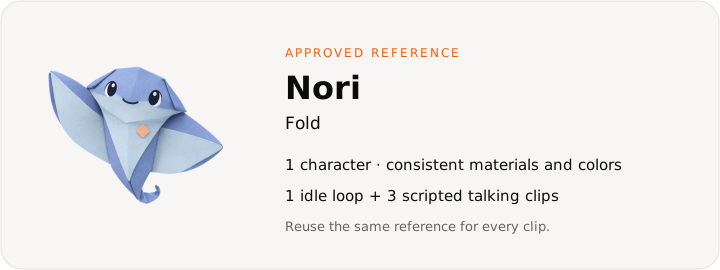
Copy this character prompt into Studio, or send it as prompt to Masko v1. Replace the name and brand details for your own product.
A friendly origami manta ray made of periwinkle and ivory folded paper, large dark eyes, a small apricot badge, soft tactile paper, calm smile, full character centered, no text or extra objects.Use a write key from API keys in MASKO_API_KEY, and an existing PROJECT_ID from GET /v1/projects. Run generation in a terminal or on your server.
curl -X POST "https://api.masko.ai/v1/mascots" \
  -H "Authorization: Bearer $MASKO_API_KEY" \
  -H "Masko-API-Version: 2026-09-26" \
  -H "Content-Type: application/json" \
  -H "Idempotency-Key: nori-reference-001" \
  -d '{
  "project_id": "PROJECT_ID",
  "name": "Nori",
  "prompt": "A friendly origami manta ray made of periwinkle and ivory folded paper, large dark eyes, a small apricot badge, soft tactile paper, calm smile, full character centered, no text or extra objects.",
  "settings": {
    "cdn_enabled": true,
    "animation_sizes": [
      360
    ]
  }
}'
Save data.id as MASCOT_ID and the first data.reference_asset_ids entry as REFERENCE_ASSET_ID. This request generates a reference image. Inspect it before animating; preview options first if you want a choice.
2. Map the interaction states
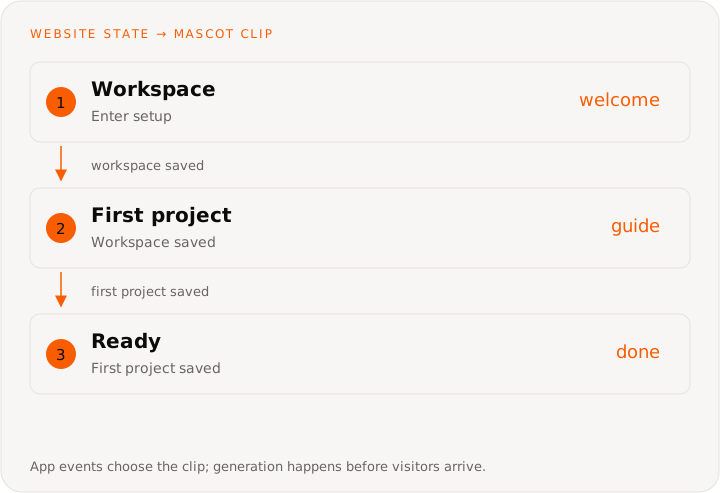
Keep the form step separate from the clip. Failed validation or a failed save leaves the visitor on the current screen. In this demo, a talking clip plays once and holds its last frame until the next step; Hear Nori replays the current clip with sound. The idle loop is available in the source for a quieter resting state.
This diagram describes the website’s state machine. You do not need to create a Masko canvas or send these UI events to the generation API.
| Website state | Clip | Trigger |
|---|---|---|
| Workspace | welcome | Enter setup |
| First project | guide | Workspace saved |
| Ready | done | First project saved |
3. Generate the animation set
Start with a five-second Standard idle loop from the approved reference. The animation prompt describes movement; the reference supplies the character’s identity.
Gentle breathing, one friendly blink and a tiny paper-wing sway. Keep the full character centered and the camera still. End in the starting pose for a seamless loop.curl -X POST "https://api.masko.ai/v1/mascots/MASCOT_ID/generate" \
-H "Authorization: Bearer $MASKO_API_KEY" \
-H "Masko-API-Version: 2026-09-26" \
-H "Content-Type: application/json" \
-H "Idempotency-Key: nori-idle-001" \
-d '{
"type": "animation",
"name": "Idle",
"source_image_asset_id": "REFERENCE_ASSET_ID",
"animation_model": "standard",
"animation_prompt": "Gentle breathing, one friendly blink and a tiny paper-wing sway. Keep the full character centered and the camera still. End in the starting pose for a seamless loop.",
"duration": 5,
"loop": true
}'Save data.job_id, data.item_id and data.asset_ids. Each paid request needs its own idempotency key; retry an uncertain request with the same key and identical body.
Choose Nori’s voice
A calm, clear adult voice. Warm, lightly playful, unhurried conversational English.curl -X POST "https://api.masko.ai/v1/mascots/MASCOT_ID/voice/samples" \
-H "Authorization: Bearer $MASKO_API_KEY" \
-H "Masko-API-Version: 2026-09-26" \
-H "Content-Type: application/json" \
-H "Idempotency-Key: nori-voices-001" \
-d '{
"description": "A calm, clear adult voice. Warm, lightly playful, unhurried conversational English."
}'Listen to the returned data.samples[].url files, then keep the chosen sample’s id:
curl -X PUT "https://api.masko.ai/v1/mascots/MASCOT_ID/voice" \
  -H "Authorization: Bearer $MASKO_API_KEY" \
  -H "Masko-API-Version: 2026-09-26" \
  -H "Content-Type: application/json" \
  -H "Idempotency-Key: nori-voice-001" \
  -d '{
  "sample_id": "SAMPLE_ID"
}'
Copy the talking scripts
Bracketed movements direct the performance and are not spoken. Keep the same words visible as text in the UI.
welcome
[waves gently, warm] Hi, I’m Nori. Let’s make a little space for your next big idea.guide
[gestures gently toward the form, encouraging] Give your first project a name. One small step, and you’re ready to go.done
[small joyful lift, proud] Your first project is ready. You’ve got this!Estimate, then generate a talking clip
Save this as nori-welcome.json. SOURCE_ITEM_ID is the idle request’s data.item_id, which has the approved source image. Use each script above for its matching clip.
{
  "type": "animation",
  "item_id": "SOURCE_ITEM_ID",
  "speech": {
    "script": "[waves gently, warm] Hi, I’m Nori. Let’s make a little space for your next big idea."
  },
  "dry_run": true
}curl -X POST "https://api.masko.ai/v1/mascots/MASCOT_ID/generate" \
-H "Authorization: Bearer $MASKO_API_KEY" \
-H "Masko-API-Version: 2026-09-26" \
-H "Content-Type: application/json" \
--data-binary @nori-welcome.jsonReview data.estimate.credits, duration and too_long. The estimate creates no video and charges no credits. When ready, remove dry_run and send the paid request:
jq 'del(.dry_run)' nori-welcome.json > nori-welcome-generate.json

curl -X POST "https://api.masko.ai/v1/mascots/MASCOT_ID/generate" \
  -H "Authorization: Bearer $MASKO_API_KEY" \
  -H "Masko-API-Version: 2026-09-26" \
  -H "Content-Type: application/json" \
  -H "Idempotency-Key: nori-welcome-001" \
  --data-binary @nori-welcome-generate.json
Repeat for the other two scripts with distinct filenames, clip names in your app and idempotency keys. Talking controls its own duration and looping; omit duration, loop and animation_prompt. Talking animation guide covers the full contract.
4. Wait for ready files
Poll each returned job ID without resending generation. If a wait times out, repeat the GET until data.status is completed or failed.
curl "https://api.masko.ai/v1/jobs/JOB_ID?wait=true&timeout=30" \
  -H "Authorization: Bearer $MASKO_API_KEY" \
  -H "Masko-API-Version: 2026-09-26"
Check the WebM and HEVC assets you intend to serve with GET /v1/assets/ASSET_ID; a finished MP4 alone is not enough. For hosted files, read the mascot’s export:
curl "https://api.masko.ai/v1/mascots/MASCOT_ID/cdn-export" \
  -H "Authorization: Bearer $MASKO_API_KEY" \
  -H "Masko-API-Version: 2026-09-26"
Use data.items[].animations[].transparent_video_webm for Chrome, Firefox and Edge, and transparent_video_mov for Safari. The export contains only ready hosted files; cdn_export_not_ready means hosting is off or no file is hosted yet; its message says which, and turn on hosting fixes the first. You can also download the files into your app’s public/ directory. Do not ship expiring signed URLs.
5. Connect the player and product events
Copy src/ and public/website-use-cases/ from the source download, then render the complete example:
import { WebsiteMascotDemo } from './WebsiteMascotDemo';

export default function Example() {
  return <WebsiteMascotDemo kind="onboarding" />;
}
Advance only after your backend confirms creation. Keep the workspace and project names, restore the saved step after a reload, and let existing users skip completed setup.
The example plays each mascot with the Masko player, from a small canvas it builds from these clips in website-mascot-delivery.ts. Replace media URLs in website-mascots.ts with your own files. In your app, put the clips in a canvas, release it and play the release, with your product events sent by fire (Play a canvas). The integration tutorial shows the React event wiring.
Copy this prompt into Lovable or another coding agent
Build a project planning website called Fold with a crisp white workspace, blue accents and a folded-paper backdrop. Use Masko v1 to create Nori, a periwinkle origami manta ray. Add three onboarding steps: workspace name, first project and ready. Generate an idle loop plus welcome, guide and done talking clips. Show the matching caption beside the form. Advance only after a successful save; keep validation errors on the current step.

Follow https://masko.ai/docs/use-cases/web-onboarding.
Use the REST API at https://api.masko.ai/v1 and inspect
https://api.masko.ai/v1/openapi.json for request shapes.
Read https://masko.ai/llms-full.txt for generation and playback guidance.
Keep MASKO_API_KEY on the server and never print it.
Show the generation costs before creating paid media.
Wait for jobs and transparent formats, then download or publish the files.
Use the finished files in the browser; do not generate on visitor actions.
Keep captions and written answers usable without sound.
Verify and measure
Check empty-name validation, back navigation, the finished workspace and project names, and a failed backend save. The guide must stay usable with sound off.
Check keyboard use, mobile layout, reduced motion, WebM and Safari playback, plus a media failure with a visible still-image fallback.
Compare setup completion and time to first project. Also check next-day return visits. These are goals to test, not a promise of higher conversion.
Generation spends your account’s credits; published file playback adds no generation charge. Use current pricing and the talking estimate for your own recipe.