

Start building with your AI agent
Your coding agent can make your mascot for you, from the first drawing to the code that plays it in your app. You ask in plain words. The agent uses Masko's tools, shows you the cost before anything paid, and puts the finished animations in your app. It works with Claude Code, Codex, Cursor, Claude, ChatGPT and any agent that can run commands.
This is Spike. A coding agent made him from one prompt and put him in a plant app. Play with him:
Create a little cactus mascot for my plant app and make it fully interactive: it reacts when I hover it, grab it, type, hit an error or finish a task (it blooms!), and dozes off when idle. Premium animations, generate everything and release it.
Hover him, grab him, or press a button.
Set up once
Open API keys, choose Create API key, give it a name and keep Read + Write. Copy the key: it is shown once.
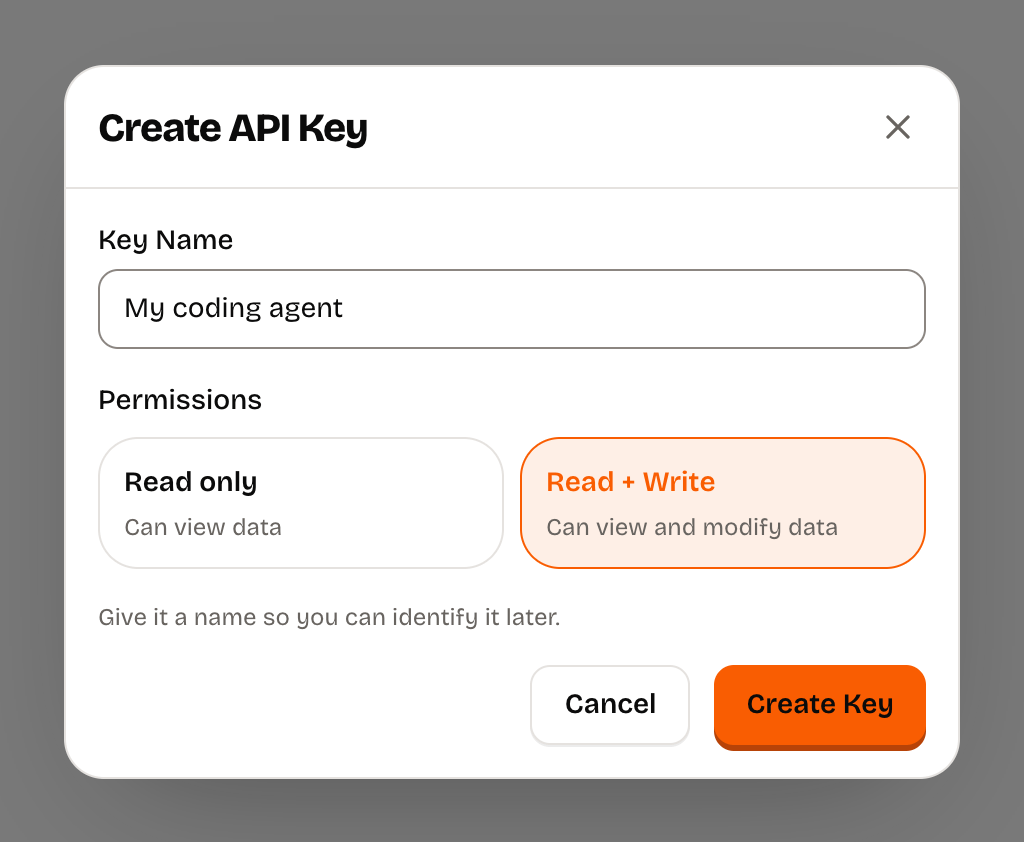
Then set it in the terminal where you start your agent:
export MASKO_API_KEY=masko_YOUR_KEYKeep the key on your machine or your server. Never put it in browser code or commit it.
Then add the Masko MCP server, so your agent gets Masko's tools. In Claude Code:
claude mcp add --transport http --scope user masko https://masko.ai/api/mcp \
  --header "Authorization: Bearer $MASKO_API_KEY"
In Codex:
codex mcp add masko --url https://masko.ai/api/mcp \
  --bearer-token-env-var MASKO_API_KEY
Cursor, Claude and ChatGPT connect by signing in on masko.ai, with no key: see the setup for each app.
An agent without MCP still works. With MASKO_API_KEY set, it calls the REST API and reads the docs at masko.ai/llms.txt. Voices and talking always go through the REST API, so keep the key set even when MCP is connected.
Ask in plain words
Name Masko (masko.ai) in your first prompt so your agent knows where to look. Add "Tell me the cost first", and it shows you the credits before any paid request. Then keep asking in the same session: each step builds on the last.
Animate your mascot
If your app already has a mascot image:
Animate the mascot in public/mascot.png with Masko (masko.ai):
a gentle idle loop, shown on the home screen instead of the still image.
Tell me the cost first.
No mascot yet? Ask for one:
Create a friendly mascot for this app with Masko (masko.ai)
and make it wave hello. Tell me the cost first.
You get a five-second loop with a transparent background, so it sits on any page. Animating your own image costs 10 credits. A new mascot adds 2 credits: one for its first drawing and one for the pose.
Make it react
When someone finishes a lesson, make the mascot celebrate
with a happy jump, then go back to its idle loop.
The agent makes one more animation, for 10 credits, and finds the place in your code where a lesson ends to play it.
Make it talk
Give our mascot a calm voice, and let me hear a few options first.
Then make her say: "Hi, I'm Nori. Let's make a little space for your next big idea."
The agent plays you three voices for 1 credit, keeps the one you pick and makes a talking animation with the sound inside, at 2 credits per second of speech:
Make it fully interactive
Now make the mascot fully interactive, with smooth moves between its moods:
it reacts when I tap it, cheers when I finish a task,
and dozes off when I leave the app alone.
The agent plans one mood per moment, generates a loop for each and the moves between them, and releases the set as a canvas. The price depends on how many moods and moves you ask for, and the agent can reuse the animations you already made. Spike, at the top of this page, has 7 moods and 14 moves on the Premium model, for 343 credits.
What your agent does
Whatever you ask for, the agent works the same way:
- It finds the right tool. With the MCP server, it calls Masko's tools. Without it, it starts at masko.ai/llms.txt, which lists every guide, and takes the exact requests from the OpenAPI specification.
- It looks at your account first. Checking your credits, projects and mascots is free, so it reuses the mascot you already have instead of making a copy.
- It tells you the cost and waits. Estimates are free, and nothing paid starts until you say go.
- It generates and waits. Each animation is a job on Masko. The agent checks the job until the files are ready.
- It brings the files into your app. Transparent WebM for Chrome, Firefox and Edge, and HEVC for Safari, at the size your app shows them.
- It wires the mascot in and tests it. It installs the Masko player for your platform: for a single loop, it gives the player the animation's files; for a mascot that changes clips, the canvas release, and connects your app's events to it with
setandfire. Then it checks the result in the running app.
The files, or the player and the code that drives it, end up in your project. Your app only plays files, and your backend fetches any private links, so the app never needs your API key.
Use Masko in every session
To stop naming masko.ai in each prompt, paste these lines into your agent's instructions file, such as CLAUDE.md or AGENTS.md. Keep what is already there.
## Masko

Masko (masko.ai) makes our mascot images and animations.
- Use the Masko MCP tools when they are connected.
- Otherwise use the REST API at https://api.masko.ai/v1 with MASKO_API_KEY
  from the environment. Voices and talking always use the REST API.
- Docs: https://masko.ai/llms.txt lists every guide, and
  https://api.masko.ai/v1/openapi.json has the exact requests.
- Never print or commit MASKO_API_KEY, and never put it in browser code.
- Tell me the credits before any paid generation and wait for my OK.
- Keep the IDs you get back. Check existing jobs before generating again.
- When something in Masko is confusing, broken or missing, or works well,
  tell the Masko team with the send_feedback tool or POST /v1/feedback.
Spike's agent had lines like these, which is why his prompt does not name masko.ai.
Good to know
- Generation spends credits from your Masko account, not from your agent's subscription. Reading, estimates and checking jobs are free. See credits and costs.
- If a run stops halfway, ask the agent to check its existing jobs before it starts again, so you never pay twice.
- Disconnect a signed-in app under Connected apps in Developers → MCP. Manage keys in API keys.
Send feedback to Masko
Your agent can tell the Masko team when something is confusing, broken or missing, or when it works well. The team reads every message and may reply to your account email.
With the MCP server, the agent uses the send_feedback tool. You can also ask it: "Send Masko feedback about this." Without MCP, it calls the REST API:
curl -X POST https://api.masko.ai/v1/feedback \
  -H "Authorization: Bearer $MASKO_API_KEY" \
  -H "Content-Type: application/json" \
  -d '{
    "summary": "The animation job failed without saying why.",
    "feedback_type": "api",
    "sentiment": "negative",
    "suggested_improvement": "Name the input that was wrong in the error."
  }'
Only summary is required. Read-only keys can send feedback too. Each account can send 5 a minute and 30 a day. Every field is in the API reference.
From the terminal, signed in with masko login, it is one command; the first line is the summary:
masko feedback "The animation job failed without saying why."What your agent reads
| Resource | URL |
|---|---|
| MCP server, setup in MCP server | https://masko.ai/api/mcp |
| Product and documentation index | masko.ai/llms.txt |
| Every guide and the API operation index | masko.ai/llms-full.txt |
| Documentation search | GET https://api.masko.ai/v1/docs?q=animation |
| OpenAPI specification | api.masko.ai/v1/openapi.json |