

Add a mascot that celebrates progress and welcomes users back
Build Little Wins with Pip, a lilac axolotl. Complete three habits, celebrate the daily milestone, then preview coming back for the next day. The demo saves its history in this browser.
A little progress, every day.
Build a routine that feels good. One small intention at a time.
A few good things for you.
Reference prompts and Masko v1 recipe · Download the full React examples
What you will build
A responsive web interface with a new brand character, working interactions and transparent video playback. This tutorial uses Little Wins, a fictional product. The demo is free to try; generating your own assets spends your Masko credits.
What you need: a React app, a Masko account, and a mascot’s published files or local downloads. Use Studio for generation, or keep a write API key on your server. Never ship the key in browser code.
Create Pip for your brand
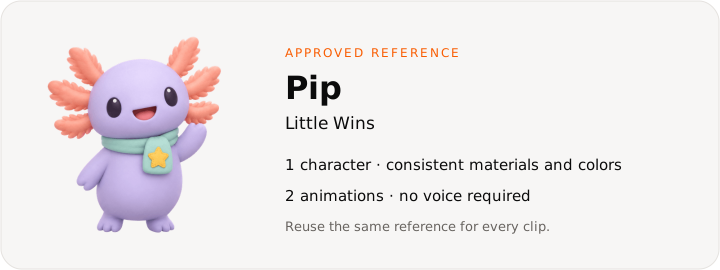
Copy this reference prompt:
A round lilac axolotl with coral gills, a mint scarf and a small yellow star badge, large dark eyes, short rounded limbs, soft clay-like 3D material, warm smile, full body centered, no text or extra props.A round lilac axolotl with coral gills and a mint scarf. Pip cheers for effort, and never makes a missed day feel like a failure.
Create the reference in Studio, or follow Create a mascot from text. Keep the approved image as the mascot’s reference so future poses share its identity. The downloaded examples include the completed demonstration media; replace the files when you make your own character.
Map the interaction states
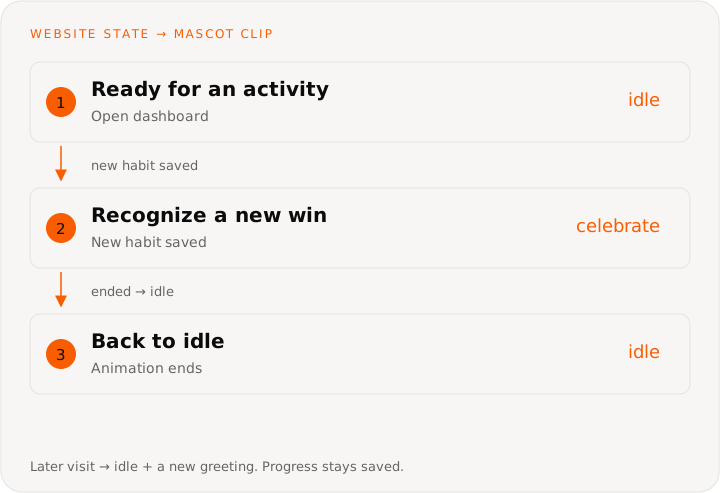
Use just two media states: idle and celebrate. When the celebration ends, return to the same idle clip. On a later visit, reuse idle with a new written greeting. Save each habit once per calendar day, then replay the celebration for a new completion. Increment a daily milestone only after all three distinct habits are complete. Returning visits preserve the history and change the text.
These are website interaction states. Masko v1 creates the media; your app chooses which clip to show. Copy the v1 requests for character creation, generation and file delivery.
Make the animation set
| Clip or moment | Performance or spoken line | Trigger |
|---|---|---|
| Idle | Gentle breathing and a friendly blink | Waiting for an activity |
| Celebrate | Two small joyful hops, then settle | A new habit is completed |
| Welcome back | Idle animation with a new written greeting | A later visit |
Create a five-second idle loop from your approved image. Keep the camera still and the full character inside the frame. For Pip, also create the celebration as a one-shot animation that settles naturally at the end.
Idle: subtle breathing, a friendly blink and a tiny relaxed sway.
Keep the character centered, preserve its design, and make a seamless loop.

Celebration: two small joyful hops, arms raised, then settle with a proud smile.
No camera movement, text or extra props. Keep the full body in frame.
Animate an existing image to avoid paying for a new pose when you already have the right one. Inspect the results before putting them in your interface.
Get files that are ready to ship
Download the transparent PNG, WebM and HEVC files into your project, or publish them to get stable CDN URLs. A completed MP4 alone is not proof that the transparent versions are ready: check the assets you intend to serve. Signed private URLs expire and should not be hardcoded into a shipped app.
The source download uses /website-use-cases/ for media. Copy that directory to your app’s public/ folder, or change the URLs in website-mascots.ts to your published files. WebM serves Chrome, Firefox and Edge; HEVC with alpha serves Safari.
Connect it to your web app
Keep progress separate from animation state. The app records each habit once per day and fires the celebration; the player returns to idle when it ends.
Put the clips in a canvas with one pose: its loop is the idle clip, and each line is an animation of that pose that starts on action:: and the line's name. Release it, and your backend fetches its delivery (Play a canvas). The page then fires each line once, by name; the Masko player plays it when the loop on screen ends and goes back to idle.
This small component shows the event wiring with local state. The source download includes the complete layout and production integration points.
import { useRef, useState } from 'react';
import { MaskoPlayer, type MaskoHandle } from '@masko/player/react';

const habits = ['read', 'walk', 'pause'];

// delivery: Pip's canvas release, fetched by your backend.
export function HabitCompanion({ delivery }) {
  const pip = useRef<MaskoHandle>(null);
  const [completed, setCompleted] = useState<string[]>([]);

  function completeHabit(id: string) {
    if (completed.includes(id)) return;
    setCompleted((previous) => [...previous, id]);
    pip.current?.fire('action::celebrate');
  }

  return (
    <section>
      <MaskoPlayer
        ref={pip}
        delivery={delivery}
        sound={false}
        style={{ width: 200, height: 200 }}
      />
      <p aria-live="polite">{completed.length} of 3 habits complete</p>
      {habits.map((id) => (
        <button
          key={id}
          disabled={completed.includes(id)}
          onClick={() => completeHabit(id)}
        >
          {id}
        </button>
      ))}
    </section>
  );
}
The source download includes validated browser storage, calendar days, disabled completed habits and the next-visit preview. The “Come back tomorrow” control deliberately simulates a later date. In a real app, use the user’s calendar day and visit history, rather than a simulation button.
Count a daily milestone only when all three distinct habits are complete. A reload or another click on an already completed habit must not award it again. Save completed dates as well as the current day so returning users keep their history.
Use the full design
Download the React source and generated media. It contains all three independent designs. Choose progress for this tutorial:
import { WebsiteMascotDemo } from './WebsiteMascotDemo';

export default function Example() {
  return <WebsiteMascotDemo kind="progress" />;
}
The archive includes the components, CSS module, media configuration and a README. Import the CSS module beside the components and keep your app’s existing React setup.
The example plays each mascot with the Masko player, from a small canvas it builds from these clips in website-mascot-delivery.ts. In your app, play your own canvas release instead. Keep spoken lines visible as text.
Check the finished experience
Finish one habit and reload: its checkmark must remain. Click a completed habit again: the count must not increase. Finish all three, preview tomorrow, and check that the next day starts at zero while the previous milestone remains. Reload again and check the welcome-back message. Reset the demo and confirm the history clears.
Test muted, with sound, with reduced motion, and with a keyboard. Check a narrow mobile viewport and both WebM and Safari’s HEVC playback. A failed media request should leave the still image or previous frame visible and offer a retry.
Connect your real product
Save progress in the signed-in user’s account. Use their timezone for daily boundaries, validate event ownership on the server, and make writes idempotent. Keep celebration brief and avoid guilt for missed days.
Costs and what to measure
A reference image and two five-second Standard animations from that image cost about 21 credits (1 + 10 + 10). The welcome-back message uses the same idle clip, so no new generation is needed for each visit.
Exports and playback of downloaded or published files add no generation cost. The tutorial catalog shows estimates, not the cost of a visitor’s session.
Measure return visits, completed activities and continued use over several weeks. Check whether the companion helps the habit itself, rather than only increasing clicks on the mascot.
Ask Lovable to build your version
Build a daily habit web app called Little Wins with a calm cream, sage and lilac design with landscape photography. Use Masko to create Pip, a lilac axolotl with coral gills and a mint scarf. Give Pip an idle loop and a celebration animation. Celebrate completed habits and daily milestones, save progress, and welcome returning users to their next activity without guilt or punishment.

Follow https://masko.ai/docs/tutorials/web-progress-companion.
Use Masko v1 at https://api.masko.ai/v1 and inspect https://api.masko.ai/v1/openapi.json.
Use real generated files, keep generation credentials on the server,
and download or publish assets before shipping the app.
Reference prompts and Masko v1 recipe · All website use cases